
“About” Tab
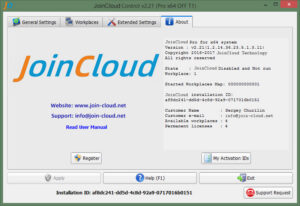
Link to the JoinCloudwebsite – opens JoinCloud website in default browser
Email “Support” – sends a request to the support service (works same as the “Support Request” button)
Information “About” – the text block in the right half of the tab contains information about the program JoinCloud: – version, license information, copyrights, etc.
The “Register” button – opens the activation dialog where you can activate purchased licenses
The “My activation IDs” button – opens a window with a list of licenses previously activated on this computer