
“Create Master License” Window
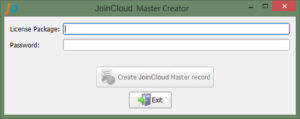
To open the window for creating the master license, you need to run the command: joincloudctl –make-master, which will close the JoinCloud Control Panel.
Enter in the field “License Package” – the batch activation code for JoinCloud.
Enter the password in the “Password” field, which will be requested when activating JoinCloud on cloned computers. This field is optional.
“Create master record JoinCloud” – creates in the disk a record of the presence of the master license (Administrator rights is required). This procedure also removes any existing JoinCloud license in the master PC.
“Exit” Button – closes the windows for creating the master license